
Creating a Thorfortune account takes only a few minutes and is completed entirely online, with no paperwork. The form asks for an email address, a password and the account currency, with the option to add a promo code and a requirement to confirm that you are at least 18 years old. This page explains every step, the information required, identity verification and the errors that most often prevent account creation.
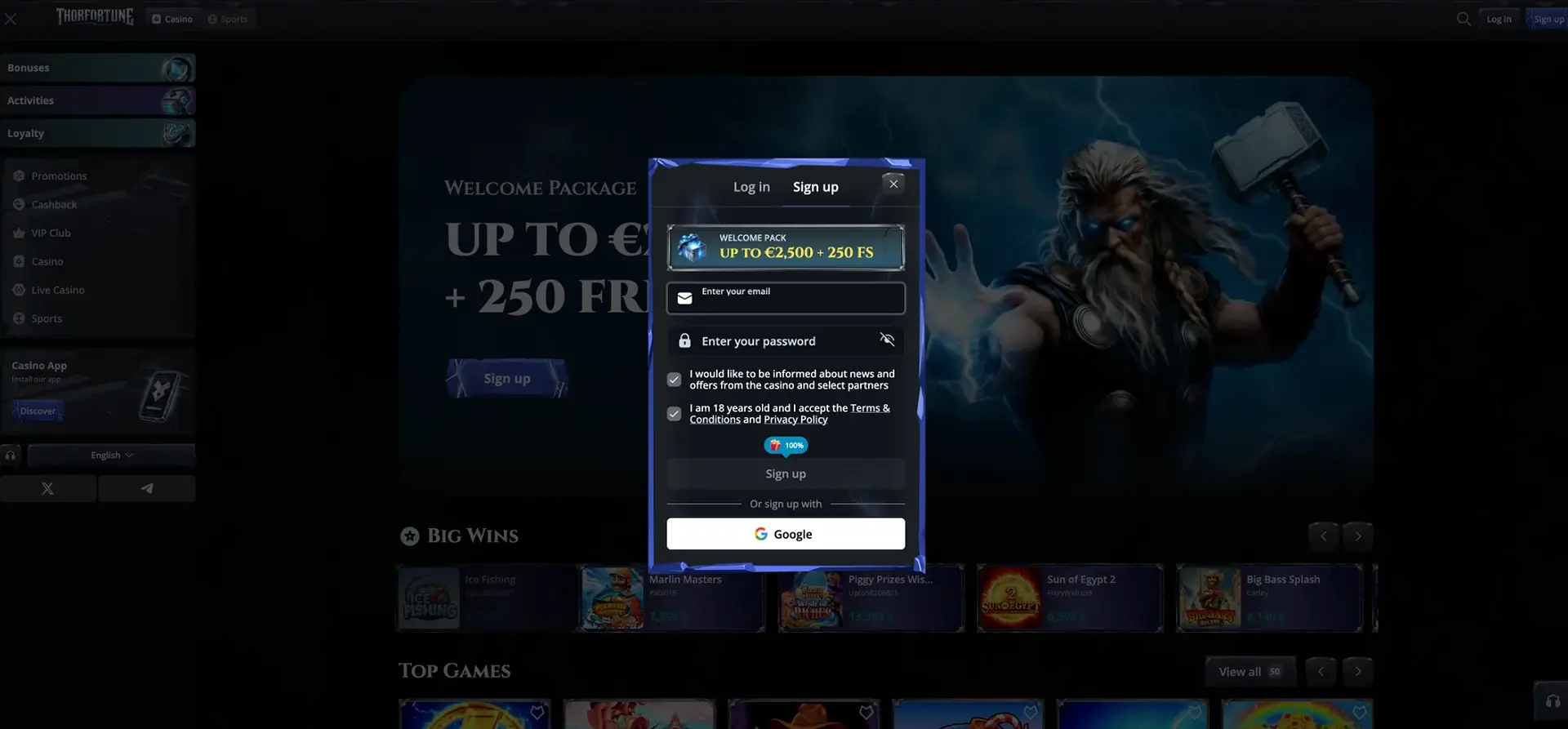
Sign-up is required to play for real money, activate a bonus and withdraw winnings. Only one account per person is allowed, so deposits, bonuses and verification checks remain linked to a single profile.
Account creation steps
The sign-up process consists of only a few fields. The numbered list below follows the order used in the form so you can complete it quickly.
- Open the official Thorfortune website and click “Sign Up”.
- Enter a valid email address that you can access.
- Choose a password that meets the requirements shown in the field.
- Select an available account currency and check whether AUD is supported; do not assume the A$ figures in this page are cashier values.
- Enable the “I have a promo code” option if you have one, then enter it.
- Confirm that you are at least 18 years old and accept the terms and conditions.
- Click “Sign Up”. You can then select your welcome bonus.
Information requested
The initial form is short, but additional information will be requested later, particularly before the first withdrawal. The table distinguishes between details required during sign-up and those requested during verification.
| Stage | Information |
|---|---|
| Sign-up | Email, password, currency, promo code (optional) |
| After login | Personal details and account preferences |
| Before the first withdrawal | Identity document, proof of address and proof of payment method |
It is advisable to provide accurate personal details from the start. If the name on the account differs from the name attached to the payment method, a withdrawal may be delayed while checks are completed.
Currency selection and minimum age
The selected account currency determines how amounts are displayed and which payment methods appear in the cashier. Australian users should check whether AUD is available and review any conversion fees before confirming an account currency.
Access is strictly limited to people aged 18 or over, or any higher minimum age required by local law. Age confirmation is part of the form, and the later identity check is used to verify this requirement before a withdrawal is processed.
Identity verification (KYC)
Verification is not required to register, but it is required before the first withdrawal. Its purpose is to confirm the account holder's identity and, where necessary, ownership of the payment method used.
Prepare clear documents in advance to avoid repeated requests:
- an official identity document, such as a national identity card or passport;
- proof of address issued within the last three months;
- proof that the payment method is held in the same name as the account.
Clear, uncropped photos showing all four corners can speed up processing. The platform may request an additional document depending on the account situation.
One-account rule
Thorfortune applies a one-account-per-person policy. Multiple accounts may lead to restrictions and cancellation of related bonuses. This rule keeps transaction history, activated offers and security checks linked consistently.
If you think you already have an account but cannot log in, use password recovery or contact support rather than creating a second account.
Common sign-up problems
A few issues occur regularly during account creation. The table links each symptom to a likely cause and a simple solution.
| Problem | Possible cause | Solution |
|---|---|---|
| Email rejected | Address already in use | Use the login page or password recovery |
| Password rejected | Requirements not met | Increase the length and add numbers and varied characters |
| Promo code inactive | Code expired or not eligible | Check the offer's validity and terms |
| Form will not submit | Required boxes not selected | Confirm your age and accept the terms |
| Page not responding | Browser cache or extension issue | Clear the cache, disable blockers and try again |
Support during sign-up
If the issue continues, support is available 24/7 through live chat and email. Live chat is suitable for quick questions while creating the account, while email allows you to attach a screenshot when the problem is technical. Keep the email address used for sign-up available.
FAQ - Registering at Thorfortune Casino
These are the most common questions about creating a Thorfortune account, with a direct answer and a practical next step in each case.
Is identity verification required to register?
No documents are required during sign-up. Identity verification takes place before the first withdrawal and normally requires an identity document, proof of address and proof of the payment method.
Can I have more than one Thorfortune account?
No. Only one account per person is allowed. If you cannot access an existing account, use password recovery or contact support instead of opening another account.
Which currency should I choose in Australia?
AUD is the familiar reference currency for Australian readers, but Thorfortune’s support for an AUD account was not confirmed during this review. Check the currencies shown in the cashier and any conversion fees before continuing.
Is a promo code required?
No, it is optional. If you have one, enable the relevant option and enter it before submitting the form; otherwise, sign-up continues normally.
What should I do if sign-up is blocked?
Check that the age and terms boxes are selected, confirm that the password meets the stated requirements, and then clear the browser cache. If the problem remains, contact support by live chat.